
Header Health Gradient

This carefully crafted Header component is perfect for Health landing pages, featuring a Gradient design that looks great and converts well.
Simply copy the code with the "Copy" button, paste it into your project and customize the colors, text and images to match your brand.
                <!--
@type: Header
@industry: Health
@style: Gradient
@category: Navigation, Page Section
@framework: Tailwind
@license: Free
-->

<style>
  @import url('https://fonts.googleapis.com/css2?family=Inter:wght@300;400;600;700&family=Merriweather:ital,wght@0,300;0,400;0,700;1,300&display=swap');

  body {
    font-family: 'Inter', sans-serif;
  }

  .font-serif {
    font-family: 'Merriweather', serif;
  }
</style>

<header class="absolute top-0 left-0 w-full z-50">
  <div class="max-w-7xl mx-auto px-6 lg:px-8">
    <div class="flex items-center justify-between h-24">

      <!-- Logo -->
      <div class="flex-shrink-0 cursor-pointer">
        <span class="text-2xl font-bold tracking-tighter text-gray-900">
          Vital<span class="text-emerald-600">Scribe</span>.
        </span>
      </div>

      <!-- Desktop nav -->
      <nav class="hidden md:flex items-center space-x-8">
        <a href="#" class="text-gray-600 hover:text-emerald-600 text-sm font-medium transition-colors">
          Our Story
        </a>
        <a href="#" class="text-gray-600 hover:text-emerald-600 text-sm font-medium transition-colors">
          Methodology
        </a>
        <a href="#" class="text-gray-600 hover:text-emerald-600 text-sm font-medium transition-colors">
          Journal
        </a>
      </nav>

      <!-- Desktop CTA -->
      <div class="hidden md:block">
        <a href="#"
          class="inline-flex items-center px-6 py-2 text-sm font-medium rounded-full text-emerald-700 bg-emerald-100 hover:bg-emerald-200 transition">
          Member Login
        </a>
      </div>

      <!-- Mobile menu button -->
      <button id="menuToggle"
        class="md:hidden inline-flex items-center justify-center p-2 rounded-lg text-gray-700 hover:bg-gray-100 transition"
        aria-label="Open menu">
        <!-- Hamburger icon -->
        <svg xmlns="http://www.w3.org/2000/svg" class="h-6 w-6" fill="none" viewBox="0 0 24 24" stroke="currentColor">
          <path stroke-linecap="round" stroke-linejoin="round" stroke-width="2" d="M4 6h16M4 12h16M4 18h16" />
        </svg>
      </button>

    </div>
  </div>

  <!-- Mobile menu -->
  <div id="mobileMenu"
    class="md:hidden absolute top-full left-0 w-full bg-white shadow-xl opacity-0 pointer-events-none translate-y-[-10px] transition-all duration-300">

    <nav class="flex flex-col px-6 py-6 space-y-4">
      <a href="#" class="text-gray-700 font-medium hover:text-emerald-600">
        Our Story
      </a>
      <a href="#" class="text-gray-700 font-medium hover:text-emerald-600">
        Methodology
      </a>
      <a href="#" class="text-gray-700 font-medium hover:text-emerald-600">
        Journal
      </a>

      <a href="#"
        class="mt-4 inline-flex justify-center px-6 py-3 text-sm font-medium rounded-full text-emerald-700 bg-emerald-100 hover:bg-emerald-200 transition">
        Member Login
      </a>
    </nav>
  </div>
</header>

<script>
  const toggleBtn = document.getElementById('menuToggle');
  const mobileMenu = document.getElementById('mobileMenu');

  toggleBtn.addEventListener('click', () => {
    const isOpen = mobileMenu.classList.contains('opacity-100');

    if (isOpen) {
      mobileMenu.classList.remove(
        'opacity-100',
        'translate-y-0',
        'pointer-events-auto'
      );
      mobileMenu.classList.add(
        'opacity-0',
        'translate-y-[-10px]',
        'pointer-events-none'
      );
    } else {
      mobileMenu.classList.remove(
        'opacity-0',
        'translate-y-[-10px]',
        'pointer-events-none'
      );
      mobileMenu.classList.add(
        'opacity-100',
        'translate-y-0',
        'pointer-events-auto'
      );
    }
  });
</script>
This is a Pro component
Access the full component collection
Get all premium components and focus on building your business
Unlock for $49
(one-time payment)Early bird discount. Lock in this price forever
Premium components
Get access to all pro components. New ones added monthly
Save components
Save your favorite components to your account
Unlimited usage
Use components as often as you want
Landing page submissions
Get your landing pages featured on LandingGo and earn a
strong backlink
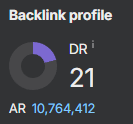 21 DR dofollow backlink from the main page